

If you are responsible for vehicles, trailers, tools, or equipment, tracking is not a gadget decision. It is an operational decision.
Bluetooth trackers can be genuinely useful, especially when you need a simple way to locate items inside a facility, yard, or job site. But Bluetooth has one built-in limitation that matters for business: it only works well when the asset stays close to the people or devices that can detect it.
That is why fleets often start with Bluetooth tags for small items, then move to GPS tracking when they need dependable, always-available visibility.
This guide gives you a practical way to evaluate popular Bluetooth trackers, understand what they can and cannot do, and choose the right approach for fleet and asset visibility.
TL;DR
- Bluetooth trackers are best for on-site items you can physically get close to. GPS is for assets that move beyond your yard and still need reliable visibility.
- If your tracking depends on someone being nearby, it is Bluetooth. If you need always-on location across routes and regions, it is GPS.
- Choose Bluetooth for quick recovery of tools, keys, and kits. Choose GPS for vehicles, trailers, and equipment that can leave the property.
- Bluetooth works inside a facility or job site with regular device pass-bys. GPS works across distance with location history and continuity.
- For fleets, Bluetooth is an add-on for small assets. GPS is the core system for mobile operations and high-risk equipment.
Bluetooth Trackers vs. GPS Trackers: What Fleet Managers Need to Know
Bluetooth and GPS trackers solve different problems. Bluetooth tags help you find nearby, on-site items, while GPS tracking gives continuous visibility for vehicles and equipment that move beyond your yard. Knowing the difference prevents gaps in coverage and wasted spend.
What Bluetooth Trackers do?
Bluetooth item trackers use BLE (Bluetooth Low Energy). The tracker broadcasts a signal. A nearby phone or compatible gateway detects it. Then the location is shown in an app.
That means Bluetooth tracking is usually one of these two experiences:
- Close-range finding
- You are near the asset, and the tracker helps you locate it. Think “somewhere in this building,” “in this yard,” or “inside this vehicle.”
- Network-assisted “last seen”
Some trackers use phone networks to update a “last seen” location when another user’s device passes nearby. This can help recover lost items in public places. It is useful, but it is still dependent on chance encounters and device density.
What GPS trackers do differently?
GPS tracking devices are built for distance. They use satellite positioning to determine location and send updates using cellular connectivity (and in some cases satellite communications, depending on the device and service plan).
For fleet operations, that difference shows up in very simple terms:
- Bluetooth tells you, “It was near a phone or gateway recently” or “it is near you right now.”
- GPS tells you, “This is where it is, even if it is far away.”
If you manage mobile assets, GPS is the default for a reason. Bluetooth is best treated as an on-site visibility tool, not a full replacement.
Pro Tip: If the asset can leave your property or travel between sites, skip Bluetooth-only and use GPS, so location updates do not depend on someone being nearby.
Top Bluetooth Trackers Compared
Most Bluetooth trackers are built for consumers. Some can still be useful in business settings, especially if your team needs a low-cost way to tag items that stay on-site. Here are the most common options, explained in business terms.
Tile trackers (Pro, Mate, Slim)
Tile is a popular choice when your workforce uses both iPhones and Android devices.
Where Tile fits well
- Office equipment, small tool cases, bags, shared kits
- Teams that need cross-platform access
- Environments where “close-range find” is the primary workflow
Things to keep in mind
- Range claims are best-case. Inside warehouses, near metal shelving, and around vehicles, range can drop.
- Some models have sealed batteries. Others have replaceable batteries. That changes long-term maintenance.
Quick guidance
- Choose the higher-range model if you expect use around large buildings or yards.
- Choose the slimmer models for wallets, binders, or flat cases.
Apple AirTag
AirTag works inside Apple’s Find My ecosystem. It is especially good when your team is iPhone-heavy and your assets pass through high-density areas like airports, hotels, and city centers.
Where AirTag fits well
- Travel kits and luggage
- Executive equipment bags
- Items that might be misplaced in public settings
Limitations for fleet operations
- Your visibility depends on Apple device presence. If the asset is sitting in a remote yard or a low-traffic area, updates can become sporadic.
- AirTag is not a fleet tracking system. It is a recovery tool that can help in specific situations.
Samsung Galaxy SmartTag
SmartTag is similar in concept to AirTag but designed for Samsung’s ecosystem.
Where SmartTag fits well
- Company-issued Samsung phone environments
- Assets that stay near team devices on-site
- Simple “find it nearby” workflows for staff
Limitations
- Strongest when your device ecosystem is consistent. Mixed-device teams often struggle with adoption and access control.
Chipolo trackers (Apple and Google network options)
Chipolo has options that align with specific networks depending on the model, and it is often chosen by teams that want flexibility without committing to one brand’s ecosystem long-term.
Where Chipolo fits well
- Wallet-style tracking and lightweight kits
- Teams that value loud alerts and simple recovery
- Mixed personal and work usage
Limitations
- As with all Bluetooth trackers, it is not built for continuous location reporting across long distances.
Pro tip: Pick your tracker based on your team’s phone ecosystem first (iPhone, Samsung, or mixed), because the best range and features do not matter if half the workforce cannot reliably use the network.
A practical comparison framework
Bluetooth trackers look similar on spec sheets. For business use, you should evaluate them based on operational fit, not marketing claims.
Here is the decision framework that tends to produce the right outcome:
1) Ecosystem coverage
- If your team is mixed iOS and Android, Tile usually avoids access friction.
- If your workforce is standardized, AirTag or SmartTag can feel smoother.
2) Range in your environment
Ask a simple question: will the asset spend most of its time inside a building, around vehicles, or near metal racks?
If yes, treat range claims as optimistic and plan for reduced real-world performance. In these environments, Bluetooth can still work, but you may need a tighter process for how tags are used and checked.
3) Battery and maintenance
A tracker with a sealed battery can be fine for personal items. In operations, sealed batteries often turn into forgotten replacements and lost coverage.
If you plan to tag many items, battery strategy matters more than it seems.
4) Durability and exposure
If assets spend time outdoors, look for models that handle dust and water exposure. Also consider the attachment method. A tracker that falls off is not a tracker.
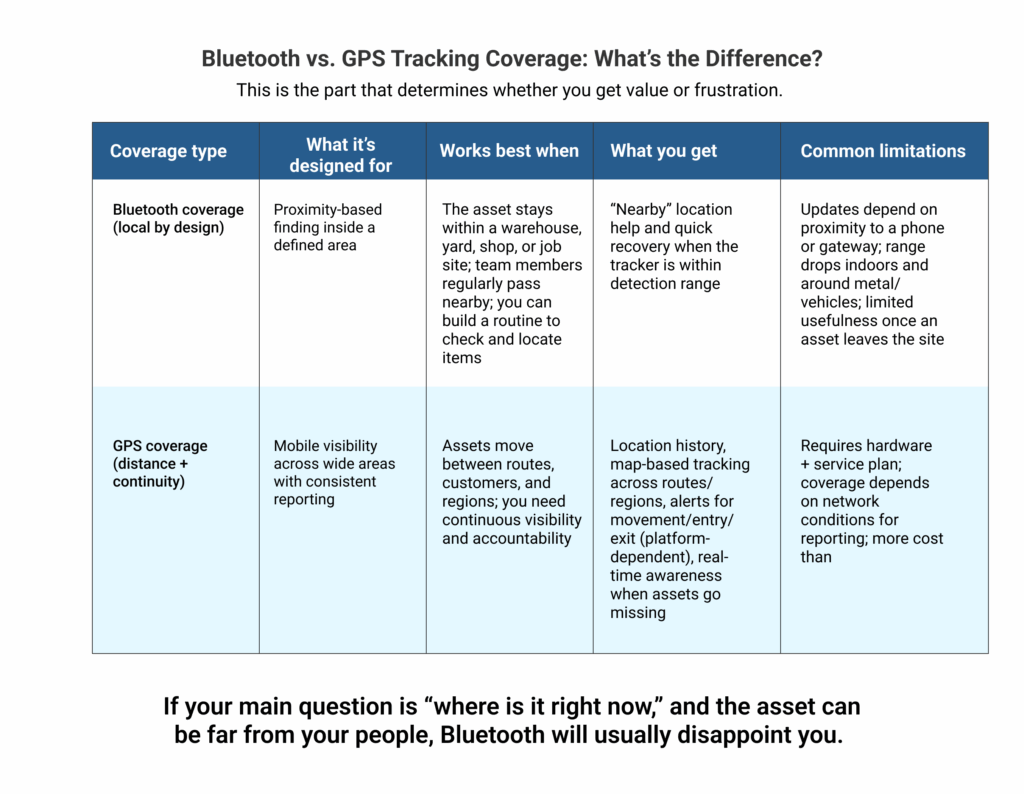
Battery Life, Durability, and Environmental Use Cases
Battery life and durability decide whether a tracker stays reliable after the first few weeks. The right choice depends on where the asset lives: indoors and protected, or outdoors in dust, rain, vibration, and heat. Match the device to the environment so you are not replacing tags or losing visibility mid-season.
Bluetooth tracking becomes much more useful when you match the device to the environment.
Indoor tracking
If the asset lives indoors:
- Battery life and ease of replacement matter most.
- You can prioritize cost and convenience.
- Bluetooth is often enough for quick recovery workflows.
Typical indoor use cases:
- IT gear checked out to staff
- Small tools stored across rooms
- Portable diagnostic kits
- Shared keys for facilities
Outdoor and job site tracking
If the asset lives outdoors or moves between job sites:
- Durability becomes non-negotiable.
- Attachment method matters.
- You should assume exposure to dust, moisture, vibration, and temperature shifts.
Bluetooth can still help in these environments, but only when the asset remains within your operational perimeter. If the asset can leave your perimeter, GPS is the safer choice.
How Bluetooth and GPS Differ in Real-World Scenarios
Accuracy looks different for Bluetooth and GPS. Bluetooth helps you zero in on an item when it is nearby, while GPS helps you locate an asset on a map when it is far away and moving between sites.
A common mistake is thinking Bluetooth and GPS compete on the same type of accuracy. They do not.
Bluetooth accuracy is “nearby accuracy”
Bluetooth helps you narrow down proximity. It is excellent at getting you from “somewhere in this building” to “it is inside this room” and then to “it is under that seat.”
For on-site teams, this is valuable because it saves real time.
GPS accuracy is geographic accuracy
GPS is meant to place an asset on a map reliably, across distance. It supports route context, location history, and operational visibility.
If the asset is a vehicle, trailer, or piece of equipment that can travel, GPS is typically the only approach that consistently supports accountability and recovery.
Data Security and Privacy in Tracking Devices
Tracking data can reveal where your people, vehicles, and assets are at any moment, so security is not optional. Before you pick a device, understand who can access location history, how data is shared, and whether the system gives you the controls a business environment requires. For business use, security is not only about encryption. It is also about control.
Bluetooth consumer networks
Network-assisted Bluetooth trackers rely on a large number of consumer devices to relay location. That can be helpful for recovering lost items in public spaces. But it is not designed around enterprise governance.
You often do not get the controls a fleet team expects, such as:
- role-based access
- clear ownership and transfer workflows
- audit trails
- predictable reporting behavior
GPS tracking platforms
Fleet GPS systems are built around centralized visibility. In a proper fleet setup, you can manage who sees what, how alerts are configured, and how data is retained.
If you are tracking assets that represent operational risk, customer impact, or high value, you should expect enterprise-grade control.
Pro tip: Treat location history like sensitive business data, choose a system that supports role-based access and clear ownership controls, not just a device that shows a dot on a map.
When Bluetooth Tracking Works (and When You Need GPS)
Bluetooth tracking works best for on-site items that stay within your yard, warehouse, or job site. GPS becomes essential when assets travel, leave your perimeter, or need reliable location updates without relying on someone being nearby. Here is the most useful way to decide.
Bluetooth tracking works when:
- The asset stays on-site or within a defined perimeter.
- Your goal is fast recover, not continuous monitoring.
- The cost of occasional “no update available” moments is acceptable.
- You can align the workflow with the way your team actually works.
Strong Bluetooth use cases:
- Tools and kits inside facilities
- Yard equipment that stays on the property
- Shared keys, cases, and portable devices
- Items that frequently get misplaced, not stolen
You need GPS when:
- The asset can leave your perimeter.
- You need reliable visibility even when nobody is nearby.
- Theft, downtime, or missed recoveries create real financial loss.
- You need location history and proof of movement.
Strong GPS use cases:
- Trailers and mobile equipment
- Vehicles and service fleets
- High-value assets that move across sites
- Remote jobs where your team is not always present
Looking for Reliable Fleet or Equipment Tracking?
Bluetooth trackers are a helpful starting point for on-site visibility, but most fleet teams eventually need a system that does not depend on proximity.
That is where a fleet-grade tracking approach fits.
If you are trying to track equipment and assets that matter to uptime, Titan GPS is positioned for the operational side of tracking, not the consumer side. The goal is simple: give your team visibility that holds up outside the Bluetooth bubble.
A practical next step is to map your assets into two groups:
- On-site assets that can be managed with proximity-based workflows
- Mobile or high-risk assets that need continuous tracking beyond the yard
Explore Titan GPS Asset Tracking Solutions
Titan GPS can support a more dependable tracking strategy aligned to fleet operations, including asset tracking setups built for visibility across real service territory.
Frequently Asked Questions
Is Bluetooth better than GPS for tracking equipment?
Bluetooth is better for nearby recovery and on-site visibility. GPS is better for mobile assets, theft risk, and reliable location history across distance.
How far can a Bluetooth tracker work?
In ideal conditions, many trackers claim ranges around tens of meters up to roughly 100 to 150 meters. In real facilities, range can drop due to obstacles, metal, and vehicle interference.
Do Bluetooth trackers work in rural or remote areas?
They can, but only if there are phones or gateways nearby to detect them. If nothing passes near the tracker, updates can stop.
When should I move from Bluetooth to GPS?
Move to GPS when the asset can leave your perimeter, when downtime is expensive, or when you need reliable location history.


